
DISPATCH PLANNING

Plan the work.Keep drivers in the loop.

Bring orders, vehicles and drivers into one planning view. Organize daily assignments and keep your dispatch team informed as plans change.

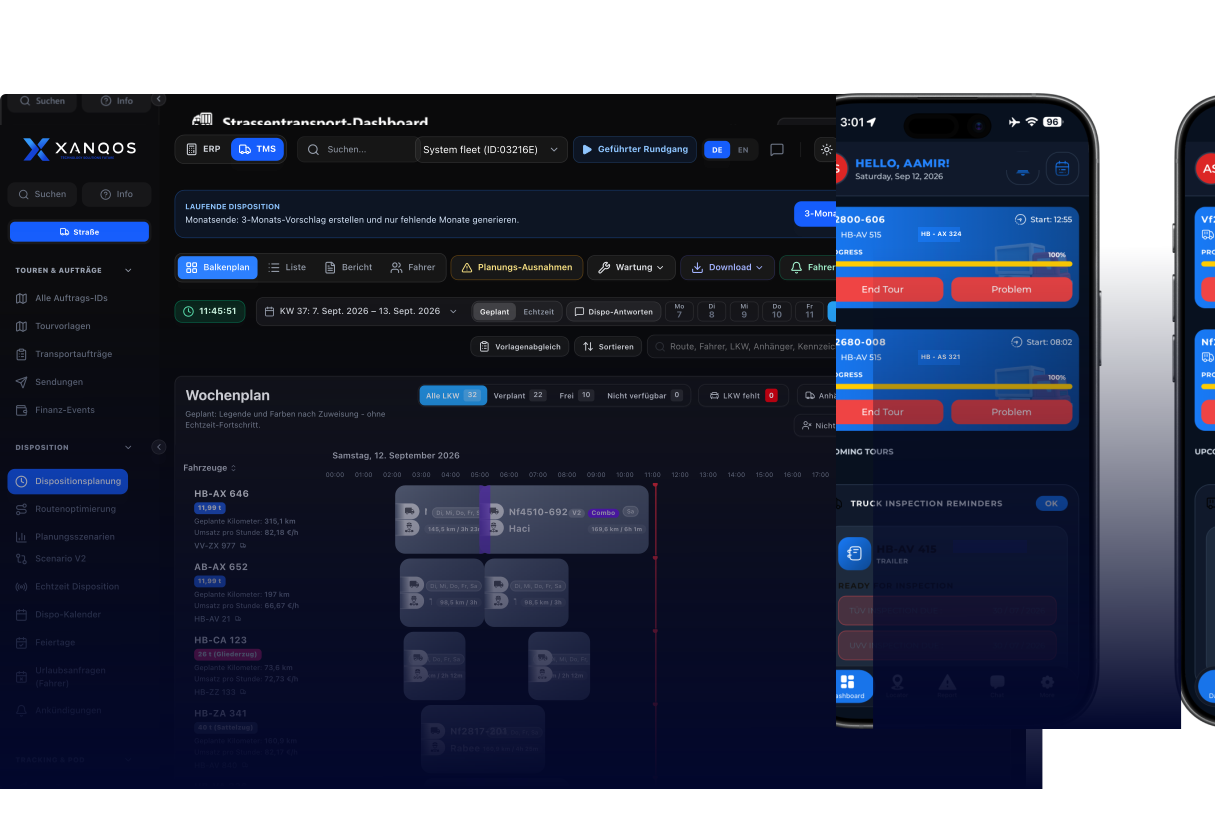
XANQOS transport management dashboard preview

Illustrative planning example with sample tour, driver and status data.

Workspace

Interactive GanttWorkspace

Explore a sample weekly plan: assigned tours, open capacity and resource gaps.

DISPATCH PLANNING

Plan the work.Keep drivers in the loop.

See upcoming tours, resource assignments and driver handovers in a Gantt planning view. When the plan changes, identify the affected work and coordinate the next assignment.

PLANNING EXAMPLE

Month-end: create a 3-month proposal and generate only missing months.

3-month proposalRefresh

COMPARISON ANALYSIS

Compare the plan with tour status

Keep planned assignments and recorded tour status in view. Identify work that has started, finished or needs a dispatcher’s attention.

Scheduled PlanningWhat has been planned?

Normal tours show as blue/grey cards

Special changeover runs highlighted in purple segments

Recorded tour statusWhat status has been recorded?
In ProgressCompletedNot StartedCancelled / Problem

Dispatch coordination

Dispatch Coordination

Bring trucks, drivers, trailers and routes together so your team can resolve assignment gaps and keep the day’s work moving.

READY TO DISPATCH

Keep drivers informed when plans change

Prepare a clear update for affected drivers when tours change. Keep the revised assignment and the message together so everyone knows the next step.

Driver notification example

Example recipients:
14 Drivers
Example changed tours:
6 Routes Updated

Notification message

Attention: Tour updates for Saturday 12 Sept have been dispatched. Check assigned terminal route.

Example: send notifications

Example status: notification sent.

Truck driver checking dispatch updates on a mobile device at a logistics terminal

From the planning desk to the driver

Give drivers the revised tour details and a clear message about what changed. This illustration shows the handover from the dispatch office to the driver.

  1. 1

    Dispatcher Plans

    Review upcoming tours and decide which assignments need to change.

  2. 2

    Resource Alignment

    Assign trucks, drivers and trailers to the planned tours.

  3. 3

    Share the update

    Prepare the message and notify the drivers affected by the change.

  4. 4

    Driver reviews the tour

    The driver checks the assigned tour and revised instructions.

Weekly Overview

Interactive planning example with sample tours and assignments.

TOUR / VERIFYMON 7TUE 8WED 9THU 10FRI 11SAT 12SUN 13
Nf2610-612 (Curtainside)Planned 1Planned 1Planned 1Planned 1FreePlanned 1Free
Nf2610-701 (Dry Van)Planned 1Planned 1FreePlanned 1Planned 1Planned 1Planned 1
Berlin-9 Express (Mega)FreeFreePlanned 1Planned 1Planned 1FreeFree
Reefer-Cargo FrankfurtPlanned 1Planned 1Planned 1Planned 1Planned 1Planned 1Free
Rotterdam Chassis 40Planned 1Planned 1Missing DriverPlanned 1Planned 1Planned 1Planned 1
  • Planned 1 (Tour Assigned)
  • Free (Available Capacity)
  • Exception (Missing Resource)

PLANNING READINESS

Planning Exceptions & Readiness

Spot missing assignments and unavailable resources before committing to the plan.

  1. Operational exception monitoring

    Driver, trailer, and vehicle readiness checks in one dispatch view.

    Planning exceptions
    Dispatcher checking operational readiness
  2. Missing Driver

    Identify planned tours without a driver assignment so your team can fill the gap.

    Missing Driver
    Empty driver seat in a parked truck
  3. Missing Trailer

    Check which tours still need a trailer assignment and coordinate the equipment required.

    Missing Trailer
    Truck tractor with no trailer attached
  4. Vehicle Unavailable

    See which vehicles are unavailable for the planned work and review an alternative assignment.

    Truck Missing / Inactive
    Truck undergoing workshop maintenance
  5. Cancelled Run

    Customer cancelled or route is flagged as cancelled by the dispatch office.

    Cancelled
    Dispatcher reviewing a cancelled route

Request a demo

Plan every resource.Dispatch with confidence.

Bring trucks, drivers, trailers and tour changes together in one dispatch workspace. See how your team can spot assignment gaps and keep drivers informed in a guided demo.