Alerts & follow-up

Take an alert through to a recorded outcome.

Set alert profiles and recipients, then organise the response. Review the event, assign responsibility and keep acknowledgement and resolution in its history.
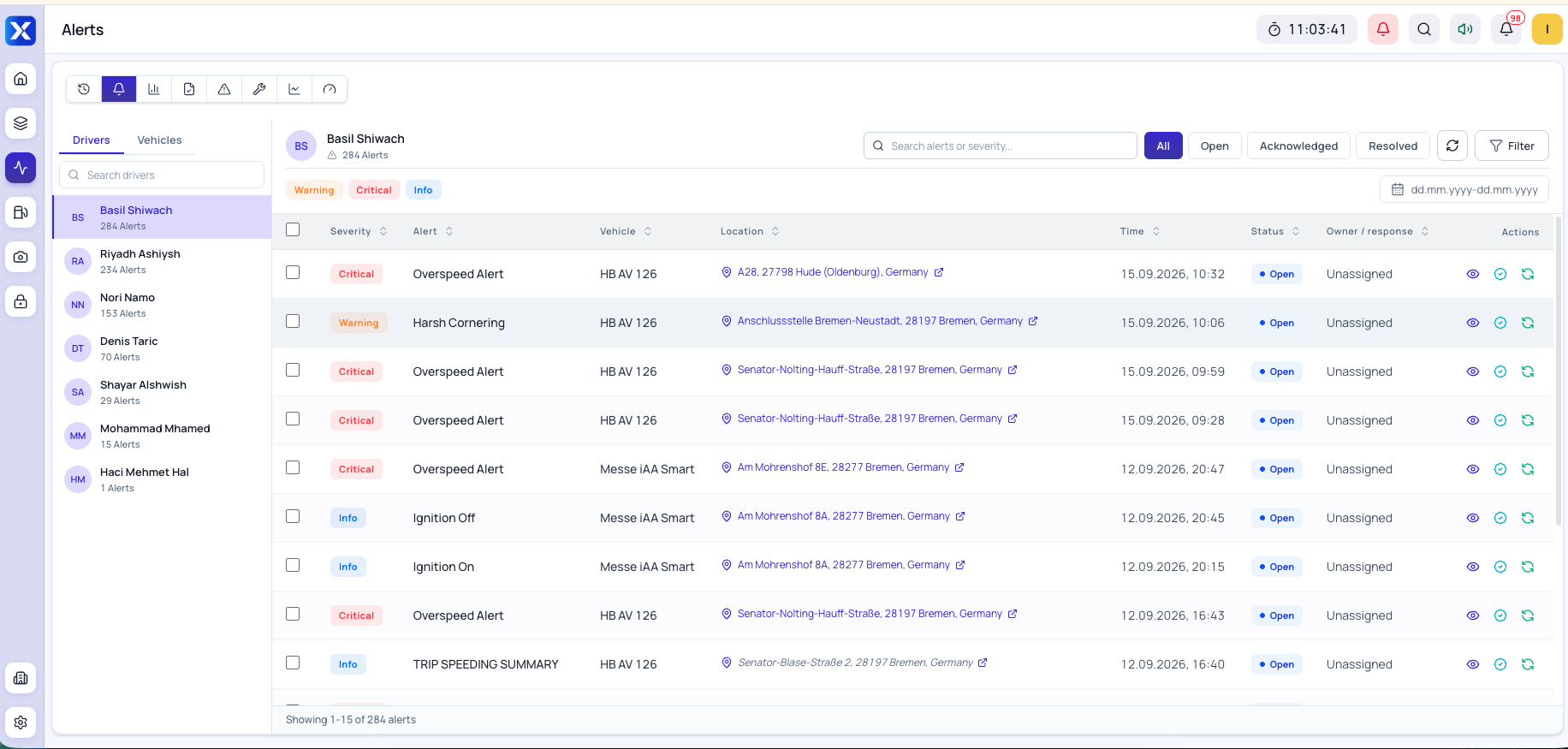
Original Alerts screen with driver list, severity, vehicle, location and follow-up status

Product interface · Open full size ↗

The workflow in the product

Alerts & follow-upStep by step.

Product workflows

Take a closer look at the work.

01

Telematics

Vehicle maintenance

Keep the next service in sight.

02

Telematics

Trips & history

Go back to the journey behind a question.

03

Telematics

Fleet reports

Prepare the fleet report your team needs.

04

Telematics

Vehicle status & performance

See what sits behind a vehicle score.

FAQ

Questions about this module

No. It identifies an event to investigate. Check the readings, vehicle context and available evidence before deciding what happened.

Request a demo

See the workflowin a demo.

Talk us through your tasks and the information your team needs to work with.